2×2 Passport Photo Maker
Create a compliant 2×2 passport photo online in seconds. Crop, resize, fix background, and download a print-ready photo that meets all US passport requirements.
Need a 2×2 passport photo for your US passport or visa application? Our online tool makes it easy to create a compliant photo from home. No need to visit a photo booth or professional studio—just upload your photo, and we'll handle the rest.
2×2 Passport Photo Size Requirements
The required 2×2 inch passport photo size must measure exactly 51×51 mm with head height between 1 inch and 1 3/8 inches.
A 2×2 passport photo is a square photograph measuring exactly 2 inches by 2 inches (51×51 mm). This is the standard size required for US passport and visa applications. The photo must meet specific requirements for size, background, head size, expression, and quality.
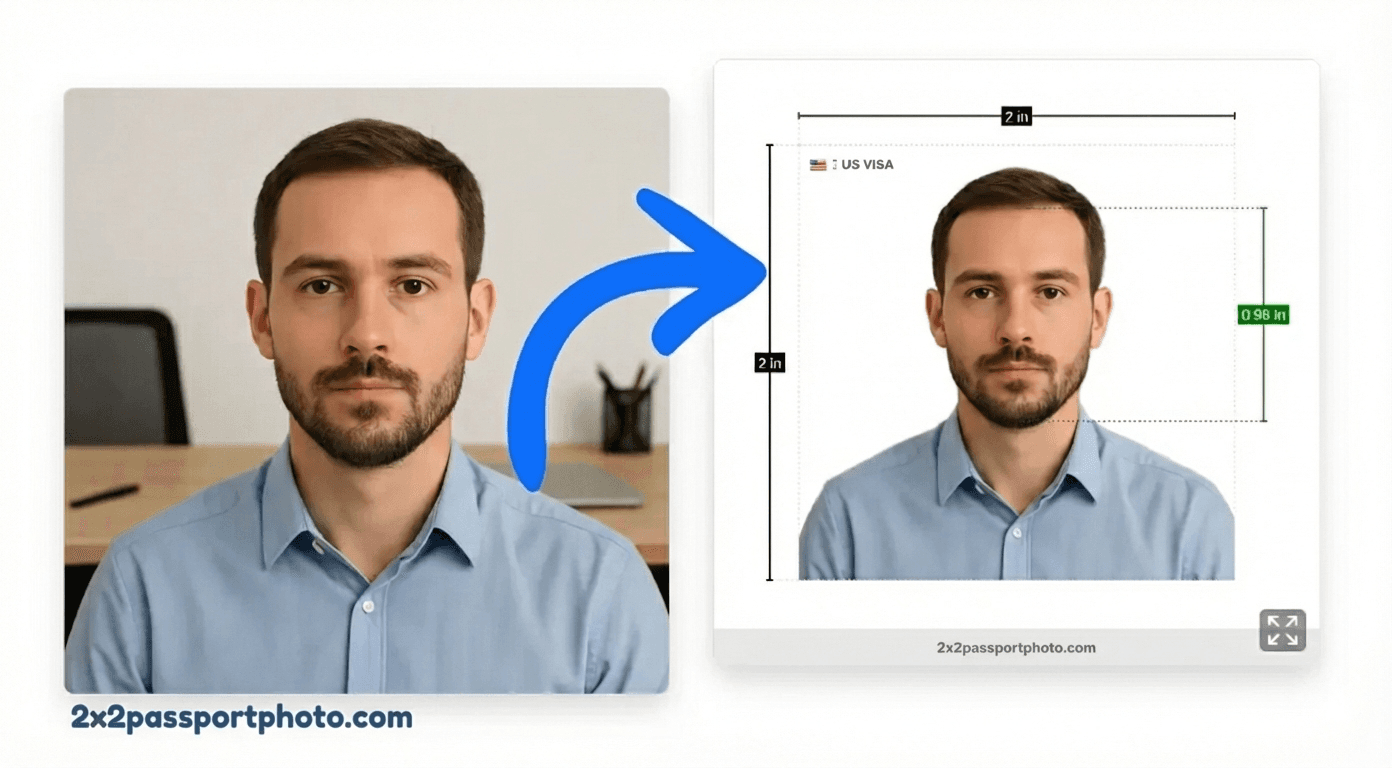
Unlike regular photos, passport photos have strict rules to ensure they can be used for official identification. Getting these requirements right is crucial—photos that don't meet the standards will be rejected, delaying your application.
2×2 Passport Photo Requirements (US)
To ensure your 2×2 passport photo is accepted, it must meet all of these requirements:
- Size: Exactly 2×2 inches (51×51 mm), or 600×600 pixels at 300 DPI
- Background: Plain white or off-white with no shadows, patterns, or other people
- Head size: Your head must be between 1 and 1 3/8 inches (25-35mm) from chin to top
- Expression: Neutral expression with eyes open and clearly visible
- Quality: Sharp focus, no blur, filters, or heavy editing
- Recent: Photo must be taken within the last 6 months
Tip
How to Resize a Normal Photo to 2×2 Passport Photo Requirements
If you already have a photo taken at home, you can resize and crop it to meet the 2×2 inch passport photo requirements. Here's what you need:
- Final dimensions: exactly 2×2 inches (51×51 mm / 600×600 pixels at 300 DPI)
- Head height: crop so head fills 70–80% of the frame (1 to 1⅜ inches chin to top)
- Background: replace any non-white background with plain white
- Resolution: minimum 300 DPI — do not upscale a low-resolution photo
Our tool handles all of this automatically — upload your normal photo and it will resize, crop, and fix the background to meet all 2×2 passport photo inch requirements.
2×2 Photo Size in MM, CM, and Pixels
A 2×2 photo is the same size regardless of whether you measure in inches, millimeters, or pixels:
| Unit | Width × Height |
|---|---|
| Inches | 2 × 2 in |
| Millimeters (mm) | 51 × 51 mm |
| Centimeters (cm) | 5.08 × 5.08 cm |
| Pixels (at 300 DPI, print) | 600 × 600 px |
| Pixels (at 96 DPI, screen) | 192 × 192 px |
The 2×2 inch size is identical to the standard US passport photo size. A 2×2 photo is passport size — for US applications, these two terms mean exactly the same thing.
Create a 2×2 Passport Photo Online
Use our online tool to create a compliant 2×2 passport photo in minutes:
Create Your 2×2 Passport Photo
Upload your photo and we'll automatically crop it to 2×2 inches with proper alignment.
Upload Your Photo
Upload a photo from your device. We'll help you crop it, remove the background, and format it for your passport application.
Start Creating PhotoFree to try. Pay only if you need a high-quality download.
How to Take a Passport Photo at Home
Taking a passport photo at home is easier than you might think. Follow these tips for best results:
- Use a plain white wall or hang a white sheet as your background
- Stand 3-4 feet away from the background to avoid shadows
- Use natural light from a window, or ensure even artificial lighting
- Face the camera directly with a neutral expression
- Keep your eyes open and look directly at the camera
- Remove glasses if they cause glare, or ensure no reflections
- Wear regular clothing (no uniforms or camouflage)
- Take multiple photos and choose the best one
Warning
How to Print a 2×2 Photo
Once you've created your 2×2 passport photo, you can print it in several ways:
- 4×6 print sheet: Our tool can generate a 4×6 inch sheet with multiple 2×2 photos that you can print at home or at a photo printing service
- Photo printing services: Print at Walgreens, CVS, Walmart, or FedEx Office (typically $0.15-$0.50 per 4×6 sheet)
- Home printer: Use photo paper and print at 300 DPI for best quality
For detailed printing instructions, see our complete guide to printing 2×2 passport photos.
Common Reasons Photos Get Rejected
Understanding why passport photos get rejected can help you avoid common mistakes. See our full guide with visual examples of every rejection reason.
- Wrong size: Photo is not exactly 2×2 inches
- Incorrect background: Not plain white, has shadows, or patterns
- Wrong head size: Head is too large or too small
- Poor quality: Blurry, pixelated, or low resolution
- Wrong expression: Smiling, frowning, or unusual expression
- Glasses issues: Glare, tinted lenses, or frames covering eyes
- Shadows: Shadows on face or background
- Photo too old: Taken more than 6 months ago
Tip
2×2 Passport Photo FAQs
What size is a 2×2 passport photo?
A 2×2 passport photo is exactly 2 inches by 2 inches (51×51 mm). At 300 DPI, this equals 600×600 pixels. This is the standard size required for US passport and visa applications.
Can I make a 2×2 passport photo at home?
Yes! You can take a 2×2 passport photo at home using your smartphone. Take a photo against a white background, then use our online tool to crop it to the exact 2×2 size and fix the background.
What background color is required for a 2×2 passport photo?
US passport photos require a plain white or off-white background with no shadows, patterns, or other people visible. Our tool automatically fixes backgrounds to meet this requirement.
How do I print a 2×2 passport photo?
You can print 2×2 passport photos on a 4×6 inch sheet at most photo printing services (Walgreens, CVS, Walmart) or at home. Our tool can generate a print-ready 4×6 sheet with multiple photos.
What is the head size requirement for a 2×2 passport photo?
Your head must be between 1 and 1 3/8 inches (25-35mm) from the bottom of your chin to the top of your head. Our tool includes face alignment guides to help you meet this requirement.
Can I wear glasses in a 2×2 passport photo?
Yes, you can wear glasses in a US passport photo, but they must not have tinted lenses and there should be no glare or reflection that obscures your eyes. The frames should not cover any part of your eyes.
Why was my 2×2 passport photo rejected?
Common reasons for rejection include wrong size, incorrect background, poor photo quality, wrong head size, wrong expression, or shadows. Our tool helps prevent these issues by ensuring compliance with all requirements.
Is a 2×2 photo the same as passport size?
Yes. For US passport and visa applications, 2×2 inches is the passport size. The terms '2×2 photo' and 'passport size photo' are interchangeable for US documents. Some other countries use different passport photo sizes (e.g. 35×45 mm for UK passports), so always check the specific country requirements.
What is a 2×2 photo in mm, cm, and pixels?
A 2×2 photo measures 51×51 mm, or 5.08×5.08 cm. In pixels, it is 600×600 px at 300 DPI (print quality) or 192×192 px at 96 DPI (screen). Always use 300 DPI when printing.
How much does a 2×2 passport photo cost?
Our tool offers a free preview. HD downloads cost $9.99 for a one-time purchase, or you can subscribe to Pro for unlimited downloads at $9.99/month. This is much cheaper than photo booths or professional studios.
Related Guides & Tools
Passport Photo Editor
Full-featured online photo editor with AI
Crop Photo to 2×2 Inches
Learn how to crop any photo to the exact 2×2 size
Resize Photo to 2×2 Inches
Resize photos with correct DPI and pixel dimensions
Print 2×2 Passport Photos
Complete guide to printing passport photos
2×2 Photo Template
Downloadable print-ready template
US Passport Photo Requirements
Detailed requirements for US passport photos